


thrive at work/Employee survey software
Buyer guide · Software
Employee survey software: what to look for.
Any form tool can send questions. Employee survey software has to do more: protect anonymity, report by team, compare over time and turn results into action. This guide covers what to check.
By Jerry Fiser, Founder & CEO · Reviewed by Marcin Bulik, Research Director · Updated November 8, 2026
What is employee survey software?
Employee survey software is a system for asking employees questions and acting on the answers. It runs engagement, pulse, onboarding and exit surveys, protects anonymity, reports results by team and tracks change over time. Good tools also suggest actions for managers and support privacy and works council requirements.
- Survey software runs engagement, pulse, lifecycle and custom surveys.
- The hard parts are anonymity, team reporting and action, not sending questions.
- Generic form tools rarely protect anonymity in small teams.
- Check data hosting, languages, integrations and works council support.
- Measure capacity as well as engagement to catch burnout risk.
Survey types survey software should cover.
| Survey | Purpose | Typical rhythm |
|---|---|---|
| Engagement or annual survey | Broad baseline of engagement and its drivers | Once a year |
| Pulse survey | Short check on a few key measures | Monthly or quarterly |
| Onboarding survey | How new hires are settling in | At 30, 60 and 90 days |
| Exit survey | Why people leave | At resignation |
| Topic survey | A specific change, policy or project | As needed |
| Capacity check | Energy, recovery, focus and resilience | With each pulse |
See employee pulse surveys and employee survey questions for examples.
Survey tools buyers commonly compare.
General survey tools such as SurveyMonkey, Google Forms or Microsoft Forms are flexible and familiar, but they are built for any kind of questionnaire. Dedicated employee survey platforms add anonymity rules, team reporting, benchmarks and action planning. The table compares the two groups by what matters for employee listening.
| Need | General survey tool | Dedicated employee platform |
|---|---|---|
| Quick one-off question | Strong | Possible but more than needed |
| Anonymous team reporting | Limited | Built in |
| Comparing teams over time | Manual | Built in |
| Manager action plans | None | Built in |
| Works council documentation | None | Usually available |
| Capacity and burnout risk | Only if you design it | Depends on the platform |
Among dedicated platforms, buyers often compare Culture Amp, Qualtrics, Workday Peakon, Microsoft Viva Glint and thrive at work.
Survey software vs form tools.
| Form tool | Employee survey software | |
|---|---|---|
| Anonymity | Often depends on settings; small groups are exposed | Minimum group sizes, suppressed results, no individual scores |
| Reporting | One overall result | Results by team, location, tenure and other groups |
| Trends | Manual | Built in, with stable core questions |
| Benchmarks | None | Comparison with similar organizations |
| Action | Up to you | Suggested priorities and plans for managers |
| Compliance | General purpose | Documentation for privacy and works council reviews |
When you need dedicated survey software.
A form tool is enough when you ask a few people a quick question and do not need to compare groups. Dedicated employee survey software becomes necessary when you survey more than a couple of hundred people. It also pays off when you need results by team without exposing individuals, want to compare results over time, need to support managers with action plans, or must document your approach for a works council or data protection officer. Most organizations reach that point earlier than they expect, often after a first survey where people worried about anonymity and managers did not know what to do with the results.
Engagement, pulse and capacity surveys compared.
An engagement survey asks how people feel about their work, their manager, their leaders and the organization. It is broad and usually annual. A pulse survey is a short, frequent check on a few measures, often drawn from the engagement survey. A capacity survey asks whether people have the energy, recovery, focus and resilience to keep performing. It can stand alone or be part of every pulse. The three answer different questions: engagement shows commitment, pulses show change, capacity shows sustainability. Survey software that supports all three in one place, with the same anonymity rules and team structure, saves a great deal of effort and keeps results comparable.
Lifecycle surveys in practice.
Lifecycle surveys capture moments that a regular survey misses. Onboarding surveys at 30, 60 and 90 days show whether new hires have the tools, information and support they need, and whether the job matches what they were promised. Exit surveys show why people leave and what might have kept them. Some organizations add surveys after internal moves, parental leave or a change of manager. Because each lifecycle survey reaches a small group at a time, combine results over several months before reporting by team, and only show results for groups large enough to protect anonymity.
The value comes from reading lifecycle results alongside regular surveys. If onboarding scores are falling in one department and first-year turnover is rising there too, you know where to look and what to fix.

Getting more from exit surveys.
Exit surveys work best when they are short, sent at the right moment and read in aggregate. Ask why the person is leaving, what would have made them stay, how they rate their manager, workload and growth, and whether they would recommend the organization. Send the survey shortly after resignation rather than on the last day, and offer a conversation with someone outside their reporting line. Group reasons into themes and count them by team every quarter. Patterns in exit data, combined with capacity scores for the same teams, show where to act before the next resignation.
Getting more from onboarding surveys.
Onboarding surveys show whether new hires have what they need and whether the job matches what they were promised. Ask at 30, 60 and 90 days about clarity of role, support from the manager, access to tools and information, connection with the team and early workload. Combine results across several months before reporting by team so small groups stay anonymous. Read them alongside first-year turnover. Where onboarding scores fall and early leavers rise in the same place, the fix is usually simple and fast: clearer expectations, a named buddy, a lighter first month or a more realistic job description.
Features to check in survey software.
- 01Measures what you need. Engagement drivers, and whether people have the capacity to perform.
- 02Protects anonymity. A minimum group size before results show, and no individual scores.
- 03Gives managers a plan. Results arrive with clear next steps, not just charts.
- 04Works in your languages. Same questions, properly translated, for every team.
- 05Fits your systems. SSO, HRIS sync or a simple employee file upload.
- 06Handles data properly. Where data is hosted, who can see it, how long it is kept.
- 07Shows trends. Stable core questions so you can compare over time.
- 08Works with employee representatives. Documentation that supports works council and privacy reviews.
Designing questions in survey software.
Good survey software helps you write good questions, but it cannot do it for you. Use short statements about one thing, a consistent agreement scale, a time frame where it matters ("in the past two weeks") and plain words. Avoid double questions such as "My manager is supportive and fair", which people cannot answer honestly if only half is true.
| Weak statement | Better statement |
|---|---|
| I am happy at work | I would recommend this organization as a place to work |
| Communication is good | I get the information I need to do my job well |
| I am not stressed | My workload is manageable |
| My manager is supportive and fair | My manager supports me when I have a problem |
How long should an employee survey be?
Long enough to measure what you will act on, and no longer. A broad annual survey usually takes ten to fifteen minutes. A pulse takes two to five. Every extra question lowers completion and honesty a little, so cut anything you would not change your plans for. Two open questions are usually enough: what to keep and what to change first.
Open questions and comment analysis.
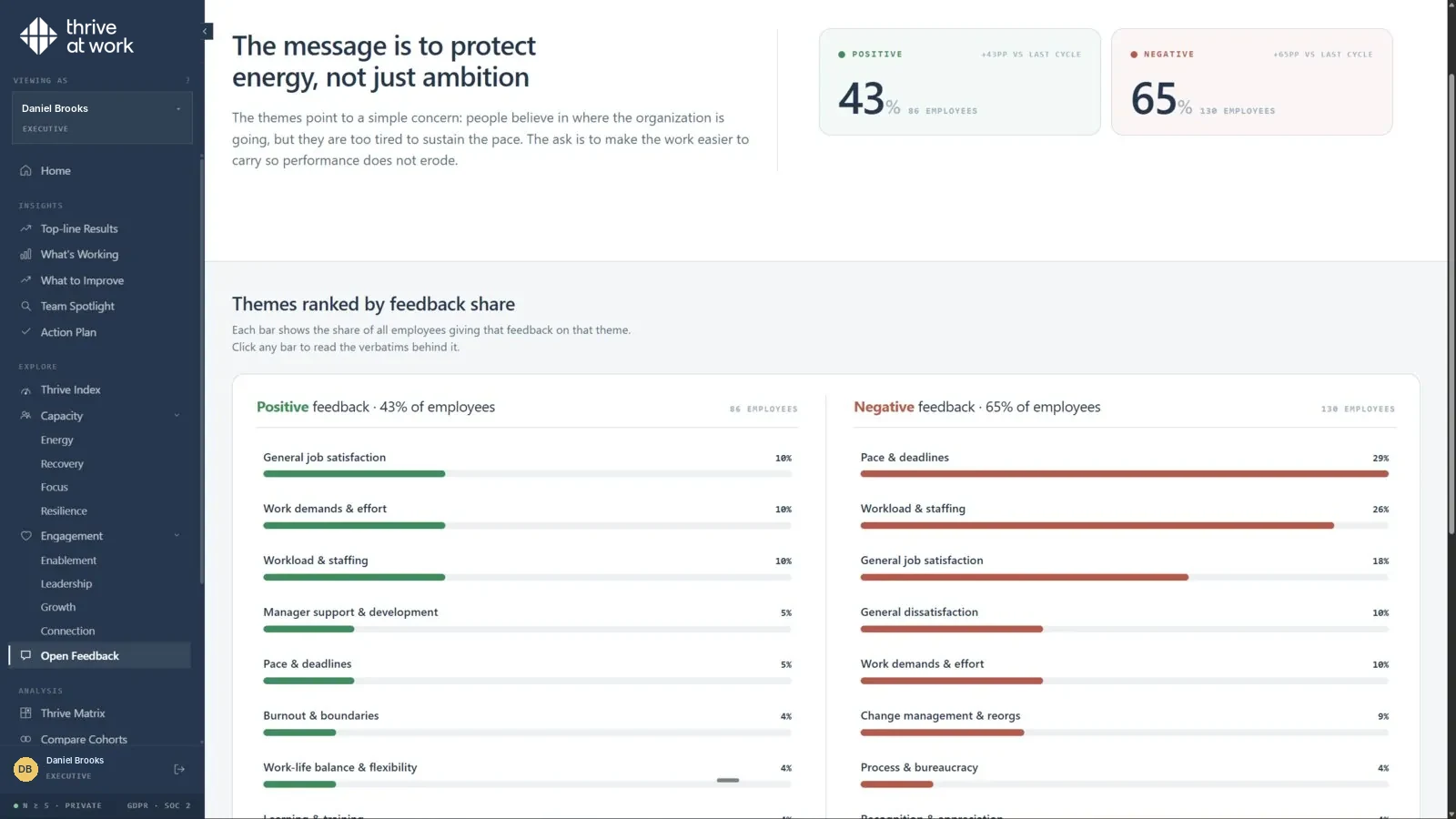
Open questions give the reasons behind scores. Two are usually enough: what should we keep doing, and what is the one thing we should change first. Thousands of comments are hard to read, so good software groups them into themes and shows how often each appears and in which teams. Protect anonymity carefully: people sometimes reveal who they are in a comment, so check for names and identifying details before comments are shared with managers. Share themes rather than individual comments when groups are small.
Choosing a response scale.
Most employee surveys use a five-point agreement scale from strongly disagree to strongly agree. It is familiar, quick to answer and easy to report. Some tools use seven or eleven points, which can show finer differences but take longer to answer and are harder to explain. For statements about energy and recovery, a frequency scale over a defined period ("in the past two weeks, how often...") often gives more accurate answers than general agreement. Whatever you choose, keep it consistent between surveys: changing the scale changes the scores, even when nothing else has changed.
Comparing results over time.
Trends are often more useful than single scores. A team that moves from low to moderate engagement after a new manager arrives tells a clearer story than a single moderate score. To compare over time, keep a stable core of statements, use the same scale and timing, and keep team structures consistent where possible. When teams are reorganized, decide in advance how historical results will be mapped to new teams. Good survey software handles this for you and shows trend lines by default.
Anonymity and data protection in survey software.
People answer honestly only when they trust that their answers cannot be traced back to them. Check the minimum group size before results show, whether filters can combine into small groups, how open comments are handled and who can see raw data. Ask where data is hosted and processed, and whether it is used for anything beyond your reports. GDPR Article 5 principles such as data minimization and purpose limitation apply. See anonyme Mitarbeiterbefragung for the German view.
Response rates and how to raise them.
- 01Explain why. Say what decisions the survey will inform.
- 02Explain anonymity. Who sees what, and from what group size.
- 03Keep it short. Respect people's time.
- 04Make it easy. Mobile-friendly, in people's own language, no login hurdles.
- 05Involve managers. A personal ask from the manager matters most.
- 06Show what happened last time. The strongest driver of participation is visible action on previous results.

Reporting features to check.
| Report | What it answers |
|---|---|
| Overview | How is the organization doing on each topic? |
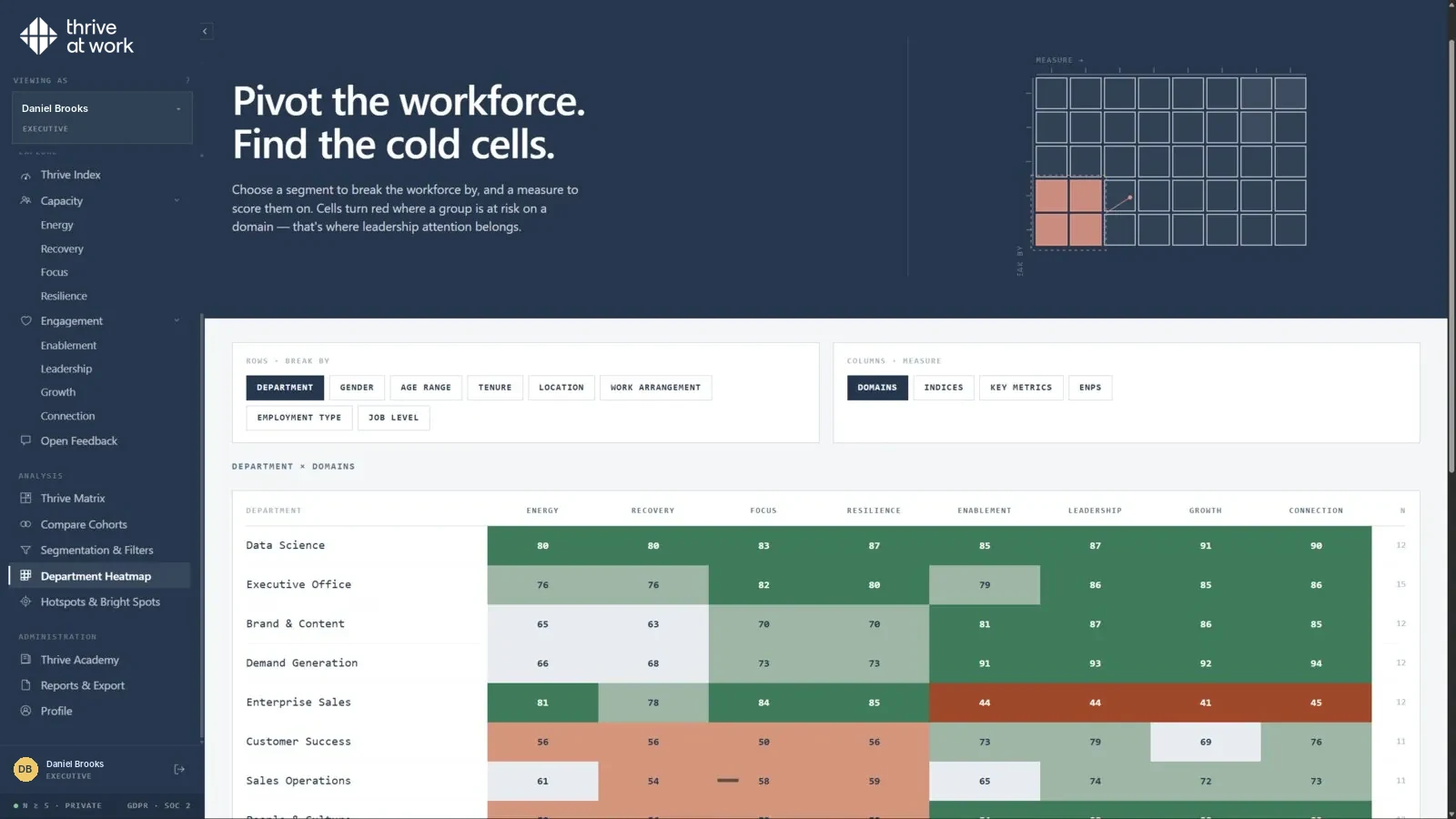
| Heatmap | Which teams differ, and on what? |
| Driver analysis | Which topics are most linked to engagement or intent to stay? |
| Trend | Are things improving since the last survey? |
| Comment themes | What are people saying in their own words? |
| Manager report | What should this team focus on first? |
Ask to see each report with realistic data, including a small team where results are suppressed.
What to measure beyond engagement.
Most survey software measures engagement and its drivers. That shows how people feel about their work. It does not show whether they have the energy to keep doing it. Adding statements on energy, recovery, focus and resilience reveals the teams that are committed but running low, the group most likely to burn out or leave. thrive research shows the share of people who did not feel regularly overwhelmed rose from 15% in the lowest-scoring tenth to 98% in the highest-scoring tenth.
Annual surveys, pulses and lifecycle surveys.
Most organizations combine three rhythms. An annual or twice-yearly survey gives a broad baseline. Short pulses every month or quarter track a few measures and check whether actions worked. Lifecycle surveys at onboarding and exit capture moments that a regular survey misses. Good software runs all three from the same platform and keeps the core statements consistent. See employee pulse survey for rhythm and question examples.
Building trust in the survey.
People answer honestly when they believe three things: their answers cannot be traced back to them, someone will read them, and something will change. Software supports the first with anonymity rules and the second with clear reports. The third depends on leaders and managers. Before launching, decide when results will be shared and how teams will discuss them, and say so in the invitation. After the survey, report back on what changed. Each cycle in which people see action makes the next survey more honest and more useful.
Reading participation as data.
Participation is a result in its own right. A team where half the people did not answer is telling you something, often that they do not believe anything will change, that they worry about anonymity or that they are too stretched to take ten minutes. Look at participation by team alongside scores. Low participation combined with low capacity is a warning sign; it often means people are too overloaded even to give feedback. Talk to the manager and the team about why, and fix the barriers before the next survey.
Surveys in organizations with many small teams.
Many organizations have teams of five to ten people, which makes anonymity harder to protect and results noisier. Good survey software deals with this by combining small teams with a related neighboring team for reporting, by limiting filter combinations, and by showing ranges or trends rather than precise scores when groups are small. Managers of small teams should still get useful guidance, even when their own results are combined: the themes in their wider group, the domains that are lowest and suggested actions that fit. Explaining these rules before the survey reassures people that small teams are protected, which is often the main barrier to honest answers.
A simple communication plan.
Announce the survey a week before launch with its purpose, timing and anonymity rules. Send the invitation, then two short reminders. Thank people when it closes and say when results will be shared. Share headlines within two weeks and team results soon after. Report back on actions at the next pulse. Each step takes minutes and together they make the difference between a survey people ignore and one they trust.
Briefing managers before launch.
Managers should know what is being asked, why, who sees which results and what will be expected of them afterwards. A thirty-minute briefing before launch, with a one-page guide, makes them confident ambassadors for the survey instead of nervous bystanders. Ask them to encourage participation personally and to avoid pressure on individuals.
Helping managers use survey results.
Managers turn survey results into change, so the software should make their job easy. The best manager reports fit on one screen: a short summary, the team's strongest and weakest topics, comparison with the previous survey and with similar teams, the main comment themes and two or three suggested actions. Add a simple guide for the team conversation: thank people, share the headlines honestly, ask what lies behind the lowest scores, agree one or two actions and set a date to check progress. Managers who follow this routine see participation and scores improve over time.
Questions that cause problems.
Some questions reliably produce poor data. Double questions combine two topics so people cannot answer honestly. Leading questions suggest the "right" answer. Questions about things nobody can change frustrate people. Questions that ask for personal details, such as health conditions, raise privacy and legal issues. And questions with unclear time frames produce answers that mix last week with last year. Review every question against these traps before launch, and test the survey with a few employees from different roles to catch anything confusing.
Accessibility and inclusion.
Every employee should be able to take part easily. Check that the survey works with screen readers, keyboard navigation and high-contrast settings, that it reads well on small phone screens, and that it is available in the languages your people actually use. Keep sentences short and words plain. Offer paper or kiosk options where some employees cannot use a phone at work. Low participation from one group is often a sign that the survey did not reach them properly, not that they do not care.
What survey software costs to run.
License fees are only part of the cost. Count the time HR spends setting up surveys and cleaning data, the time managers spend reading results and holding team conversations, and the time employees spend answering. A tool that saves HR a week of manual reporting and gives managers a one-page summary often costs less overall than a cheaper tool that needs heavy support. Ask vendors for realistic estimates of internal effort, and check them with a reference customer of similar size.
Governance for employee surveys.
Clear governance protects trust and saves time. Write down who owns the survey program, who approves new questions, who can see which results, how long data is kept and how results may and may not be used. Agree these rules with leadership, HR, data protection and, where relevant, the works council, and publish a short version for employees. Review the rules once a year. When questions arise mid-cycle, such as a leader asking to see results for a group below the minimum size, the written rules give a clear and fair answer.
Governance also covers ad hoc surveys. As survey software becomes easy to use, many teams start sending their own questionnaires, which leads to survey fatigue and inconsistent data. A simple rule helps: any survey sent to more than one team goes through the central program, uses the standard anonymity settings and is scheduled so it does not clash with the main survey calendar.
Bringing it together.
Choosing survey software is less about features and more about fit. The right tool protects anonymity in your smallest teams, gives managers a clear first step, reaches every employee in their language, fits your systems and data rules, and measures what your leaders need to know. For many organizations that now includes capacity, because engagement alone does not show which committed teams are running low. Start with the decisions the survey must inform, test the manager experience with real managers, and plan the first round of action before the first invitation goes out.
What thrive at work does differently.
Most engagement tools ask how people feel about their work, manager, leadership and company. thrive at work asks that too, and adds a second question: do people have the energy, recovery, focus and resilience to keep performing? The two answers sit side by side as an Engagement Index and a Capacity Index, each from 0 to 100, and place every team on the thrive matrix: Thriving, Burning out, Coasting or Depleted.
That second index matters because a strong engagement score can hide a team that is close to exhaustion. thrive research shows that employees who are highly engaged but burning out lose three times as many days to not working effectively. An engagement-only tool reports those teams as a success.
thrive at work features.
| Feature | What it means in practice |
|---|---|
| Engagement Index | Purpose, leadership, connection and growth, scored 0 to 100 |
| Capacity Index | Energy, recovery, focus and resilience, scored 0 to 100 |
| thrive matrix | Every team placed as Thriving, Burning out, Coasting or Depleted |
| Team heatmaps and cohort comparisons | See where scores differ by team, location or group |
| Open feedback themes | Comments grouped into themes, with anonymity protected |
| Action plans | Three suggested priorities per team, routed to the manager, the organization or the individual |
| Thrive Academy | More than 300 short courses matched to each person's lowest-scoring area |
| Languages and setup | 13 languages, SSO, HRIS sync or file upload, hosted in the EU |
Survey software and works councils.
In Germany and several other European countries, employee surveys usually involve the works council. Good survey software makes that easier with clear documentation of questions, anonymity rules, data flows and reporting levels. See Mitarbeiterbefragung und Betriebsrat and § 87 BetrVG.
Running surveys across countries.
International surveys need careful translation, not word-for-word conversion. Check that the platform offers professional translations of its standard statements and lets local teams review custom questions. Answer patterns also differ by culture, so compare each country with its own history before comparing countries with each other. Check local rules on employee representation and data protection in every country you survey.
How to choose survey software.
- 01Write down the decisions. What will you do differently based on results?
- 02List must-haves. Anonymity rules, languages, integrations, hosting.
- 03Shortlist three vendors. Compare the same features, the same way.
- 04See the manager view. Ask for a demo of what a team manager sees.
- 05Check privacy early. Bring in data protection and employee representatives.
- 06Run a small pilot. One or two teams before a full rollout.
Questions to ask survey software vendors.
- 01Can we see the full question library?. And what each statement measures.
- 02What is the minimum reporting group?. And can filters be combined to get below it?
- 03How are open comments protected?. Detection of names and identifying details.
- 04Which languages are professionally translated?. For both standard and custom questions.
- 05How do lifecycle surveys work?. Triggers from HR data, or manual?
- 06What do managers receive?. Report format, timing and suggested actions.
- 07How is data hosted and deleted?. Region, retention, deletion on request.
- 08What does a typical rollout take?. Weeks to first results, roles needed.
Common mistakes when buying survey software.
Buying the most features instead of the clearest results. Choosing a tool managers will not open. Asking too many questions too often. Ignoring anonymity in small teams. And measuring engagement alone, then being surprised by burnout and resignations in teams that scored well.
A pre-launch checklist.
| Item | Done when |
|---|---|
| Purpose | You can say in one sentence what the survey will inform |
| Questions | Every question links to a decision |
| Anonymity | Group size and filter rules are set and explained |
| Representatives | Works council or employee representatives have agreed |
| Data | Teams and hierarchy are correct in the platform |
| Communication | Invitation, reminders and manager briefing are ready |
| Results plan | Dates for sharing results and team conversations are set |
Survey software glossary.
| Term | Meaning |
|---|---|
| Response rate | Share of invited people who answered |
| Minimum group size | The smallest group for which results are shown |
| Suppression | Hiding results for groups below the minimum size |
| Likert scale | An agreement scale, for example from strongly disagree to strongly agree |
| Lifecycle survey | A survey tied to a moment such as onboarding or exit |
| Pulse | A short, frequent survey |
| Driver analysis | Statistics showing which topics relate most to an outcome |
| Capacity | The energy, recovery, focus and resilience people have available |
The future of employee surveys.
Employee surveys are getting shorter, more frequent and more focused on action. AI tools now help summarize open comments and draft suggested actions. Buyers increasingly ask whether a survey can show burnout risk and sustainability, not only engagement. And employees expect to see their own results and what changed because of them. Software that keeps surveys short, protects anonymity, measures capacity alongside engagement and helps managers act will define the next generation of employee listening.
Surveying frontline and deskless workers.
Many workers never sit at a computer: in stores, warehouses, hospitals, factories and on the road. Survey software must reach them. Check for mobile access without a company account, QR codes or SMS links, kiosk options, short surveys and all the languages your workforce uses. Give people time in their shift to answer. Results from frontline teams are often the most useful, because they are the least heard.
Benchmarks: useful and limited.
Benchmarks compare your results with other organizations. They help answer "is this normal?" but they are averages across very different companies. Use them for context, not targets. The most useful comparisons are usually internal: a team against its own history and against similar teams. thrive at work offers benchmarks across 12 sectors and 27 industries from its validation research, alongside internal comparisons.
From results to action plans.
Survey software should make the step from results to action short. A good action plan names one or two priorities, the owner of each (the manager, the organization or the individual), what will be done, by when and how progress will be checked. thrive at work suggests three priorities per team, routed by who owns the change, and links individuals to short courses matched to their lowest-scoring area.
| Priority | Owner | Action | Check |
|---|---|---|---|
| Energy is low | Manager | Remove one recurring meeting; agree priorities weekly | Next pulse |
| Recovery is low | Organization | Clear rule on after-hours messages | Next pulse |
| Growth is low | Manager and individual | Agree one stretch task per person | Quarterly review |
thrive at work measures engagement (purpose, leadership, connection, growth) and capacity (energy, recovery, focus, resilience) in one anonymous assessment: see how the assessment works.
Good survey software work needs a survey people trust and results managers can act on. In Employee Experience Management (EXM) terms, thrive at work is an employee engagement platform that measures engagement and capacity to perform in one anonymous survey. See the employee survey platform or read more about employee engagement.
Sources.
- GDPR Article 5. gdpr-info.eu
- thrive index validation study. thrive at work, 2025–26. Methodology.
Common questions
What is the best employee survey software?
Can I use a free form tool for employee surveys?
How often should we run employee surveys?
Does employee survey software need works council approval?
What should employee survey software measure?

One assessment, two indices.
A 30-minute call shows what a first measurement would reveal, team by team.